Photo V-Sculpt
Best for portraitsTonal grooves carved with a V-bit. Made for portraits — faces, pets, the photo on the fridge.
Drop in a photo — a portrait, a logo, a sketch. HCraft turns it into a carve, previews it using your selected material profile, and runs pre-cut checks before you export.
By joining you agree to receive launch updates. Privacy
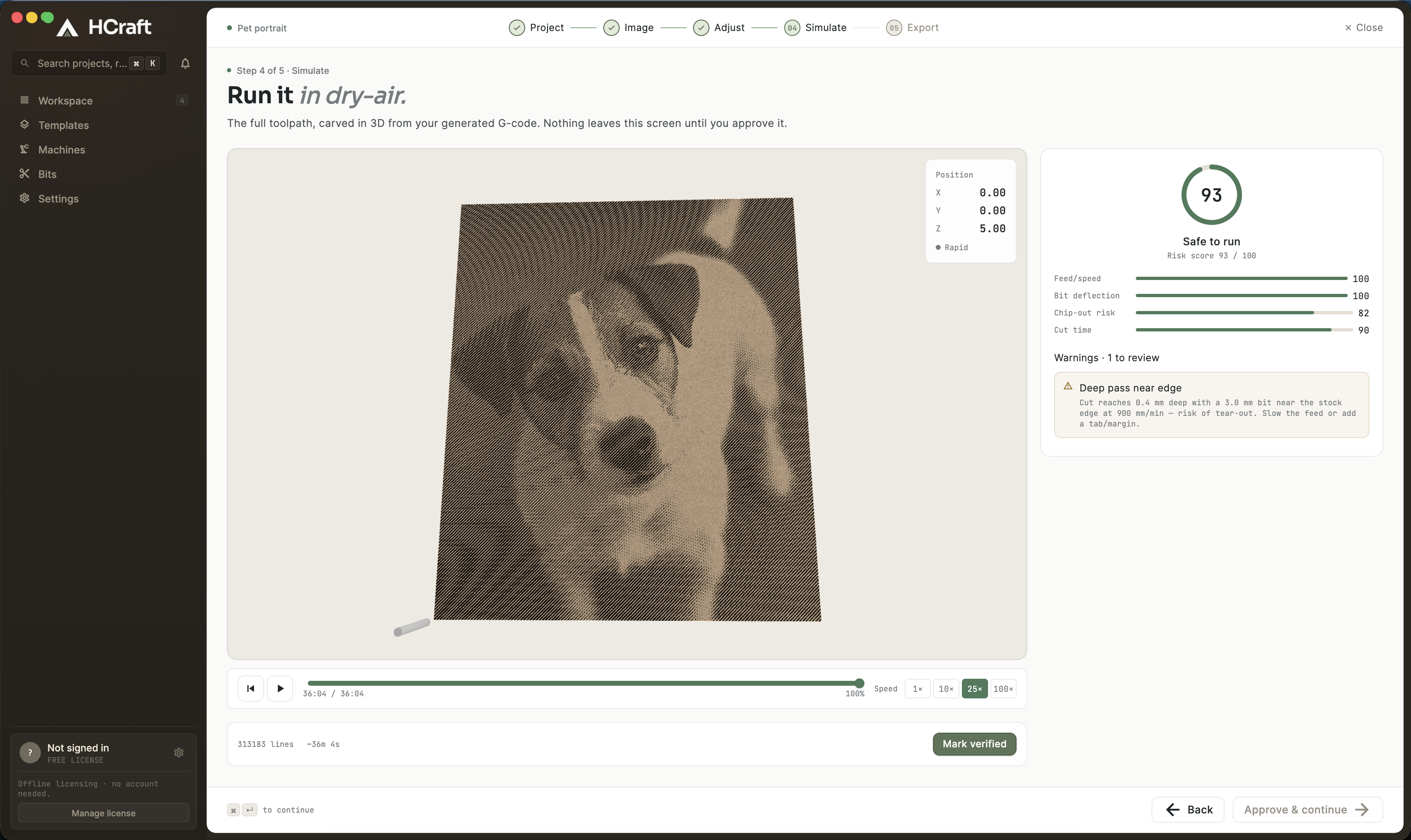
Step 4 of 5 — review the simulated run and resolve reported checks before export.
No CAD background needed. If you can pick a photo, you can carve it.
01 — From photo to carve
Start from a supported image. Pick a style and use the HCraft preview to inspect the expected carve before simulation and export.
Tonal grooves carved with a V-bit. Made for portraits — faces, pets, the photo on the fridge.
Variable dots that read as light and shadow. High-contrast art, album covers, posters.
Clean carved lines. Logos, signs, line art, lettering.
The preview uses your selected material profile and project settings. Verify the simulation and perform a test cut before committing valuable stock.
02 — The simulation room
Your material profile, bit, and machine limits are evaluated together. Resolve reported warnings, approve the result, and perform a test cut for a new setup.
The simulated run must be approved before HCraft enables G-code export.
03 — Why it matters
Review depth, shading, and toolpath context using the selected material profile before moving to simulation.
HCraft checks feeds, depths, bit reach, and the selected machine envelope, then reports warnings that need your attention.
A one-time license that works offline. No account, no subscription, no trial clock. The G-code and setup sheet it exports are yours to keep — pin them to the wall.
04 — How it works
Drop a photo, logo or sketch. HCraft reads the shapes worth carving.
Pick a carve style — V-carve lines, relief, fill — and see it applied instantly.
Set your stock, bit and depth. The render updates as you turn the dials.
Review the simulated toolpath and resolve the checks reported for your setup.
Approve the cut and walk to the machine with G-code and a setup sheet.
05 — A note from the shop
Engraving a photo on my CNC should have been the fun part. Instead I was stuck between software made for machinists and settings that never landed — either the wood came out shredded or the image was too light to see. HCraft is the simple path I wish I'd had: drop in a photo, let it dial in the settings, and get a piece you're proud of.
06 — Questions
HCraft is scheduled to launch on November 1, 2026. Waitlist members will receive the release details by email.
HCraft launches with Free and a one-time Maker license. Final Maker pricing and the detailed feature comparison will be published before sales open.
HCraft 1.0 targets desktop and hobby CNC routers using GRBL-compatible G-code. The tested machine list and exact compatibility notes will be published before launch.
Windows 11 and macOS 12 Monterey or newer.
Especially for you. HCraft is a guided flow: pick a photo, pick a style, and the render plus the pre-cut checks tell you exactly what will happen before you commit your material. No CAD background needed.
Release details for November 1, plus the Free and Maker offer before sales open. Only launch news, nothing else.
One email at launch. First in line for the free tier.
By joining you agree to receive launch updates. Privacy